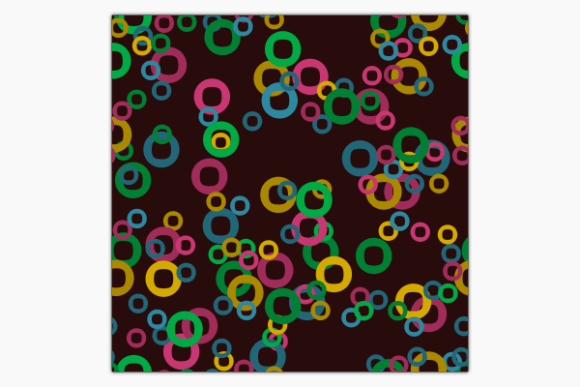
Valentine’s Day Digital Papers: A Practical Guide for Creative Use in Design Projects
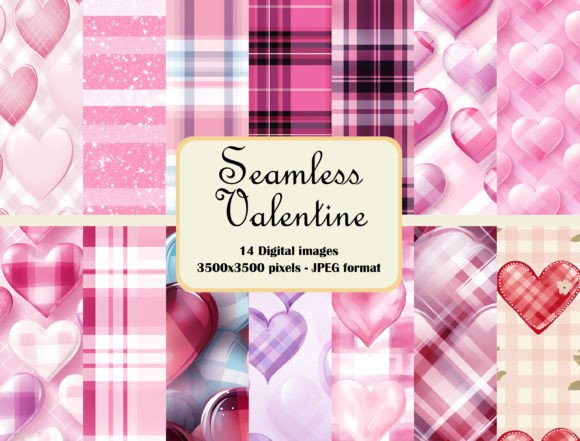
Valentine’s Day is more than just a celebration of love—it’s an opportunity for creators to express romance through design. Whether you're preparing wedding invitations, designing greeting cards, or crafting gift wrap, the right visual elements can make all the difference. Valentine’s Day Digital Papers offer a ready-made solution with a set of 12 seamless repeat patterns featuring hand-drawn decorative hearts and romantic design elements. These high-resolution digital backgrounds (JPG format, 12 x 12 inches, 3600px x 3600px, 300 dpi) are ideal for both print and digital applications, providing a professional look that enhances any project.
What Are Valentine’s Day Digital Papers?
Valentine’s Day Digital Papers refer to a curated collection of digital background designs optimized for use in creative projects. This particular product includes 12 unique seamless repeat patterns, each containing hand-drawn hearts and other romantic motifs. The JPG files are delivered at a resolution suitable for commercial printing, making them versatile for both personal and professional use.
Seamless patterns are especially valuable because they tile without visible edges, allowing for infinite customization. Whether you’re working on a small card layout or a large poster, these patterns adapt easily to maintain a cohesive and elegant appearance. Their high resolution ensures crisp prints, while their digital nature makes them convenient to edit and integrate into various design workflows.
How Do These Digital Papers Fit Into Your Workflow?
Incorporating Valentine’s Day Digital Papers into your workflow begins with identifying where such assets add value. For instance, when creating a series of themed greeting cards, these papers can serve as consistent background templates across all designs. Similarly, in scrapbooking or event planning, they provide a romantic foundation that can be layered with text, photos, and other graphics.
The key benefit of using pre-designed digital papers is efficiency. Rather than starting from scratch, you can focus on refining your message, layout, or branding while relying on the paper to deliver a polished aesthetic. This is particularly helpful during tight deadlines or when managing multiple projects around the same theme.
Preparation Tips Before Using the Digital Papers
- Understand your project requirements: Know whether you need the pattern for print or digital media. While the provided resolution works well for print, ensure your software supports high-quality output if you plan to scale the image.
- Organize your assets: Save the downloaded papers in a clearly labeled folder, perhaps grouped by color or style. This helps when you're sourcing the right pattern quickly for different tasks.
- Check compatibility: Verify that your design software (such as Adobe Photoshop, Illustrator, Canva, or Inkscape) supports seamless tiling. Most do, but knowing how to manipulate the pattern within your preferred tool can streamline the process.
Using the Patterns Before, During, and After a Project
Before a project: Use one of the patterns as a mood board base. Its romantic visuals can help you visualize the overall tone and direction of your work, whether it's for a client or a personal venture.
During a project: Apply the patterns as backgrounds in wedding invitation suites, social media posts, or packaging mockups. They allow you to maintain a consistent theme while focusing on the content—like wording, typography, and imagery—that brings your message to life.
After a project: Archive the unused patterns for future reference. You might find a specific heart motif or border element useful for another holiday, anniversary, or special event. Keeping these organized in a digital library ensures easy access later.
Workflow Integration Examples
Here are some real-world scenarios where these digital papers fit naturally into a creative process:
- Wedding Invitations: Start by selecting a pattern that complements the wedding color palette. Overlay it with elegant fonts and event details. Test how the pattern interacts with your chosen text styles and images to avoid overcrowding the design.
- Gift Wrap Design: Import the pattern into your design platform and adjust the scale to match your wrapping dimensions. Add a subtle layer of white space or a contrasting ribbon graphic to highlight the pattern without overwhelming the eye.
- Blog Post Headers: Choose a pattern with a lighter or transparent feel. Apply it as a texture behind headlines or featured images to create a warm, inviting atmosphere for readers.
Best Practices for Editing and Customization
Editing the Valentine’s Day Digital Papers requires attention to detail and an understanding of how to enhance rather than obscure the original design. Here are a few practical tips:
- Layering techniques: Place the pattern on a lower layer and apply blending modes like Multiply or Overlay to see how it affects colors and contrast above it.
- Color adjustments: If the pattern doesn’t match your brand colors or project theme, consider desaturation or tinting to align it visually. Be cautious not to lose the clarity of the hand-drawn elements.
- Resizing considerations: Since the pattern is already seamless, resizing shouldn't cause alignment issues. However, always test the final output before printing to confirm there are no pixelation problems.
Combining with Other Assets
These digital papers work best when paired with complementary design elements. Think about how they interact with:
- Fonts: Romantic script fonts pair beautifully with heart motifs. Sans-serif or serif fonts may require a bolder pattern to stand out.
- Photography: If using photos in your design, place the pattern subtly in the background to avoid distracting from the main subject.
- Icons and illustrations: Integrate additional hand-drawn icons or illustrations that echo the same style to build a unified visual language.
Efficiency and Consistency Across Multiple Projects
One of the most significant advantages of using this set of seamless repeat patterns is the ability to maintain consistency across a range of materials. Imagine creating a complete Valentine’s Day marketing suite for a business: from email headers to postcards, the same pattern can unify all pieces, reinforcing brand identity and thematic cohesion.
To maximize efficiency:
- Create template files: Set up reusable templates with the pattern embedded as a background layer. This saves time when producing similar documents repeatedly.
- Use smart objects in Photoshop: Convert the pattern into a smart object so you can scale it without losing quality and apply non-destructive edits.
- Batch processing: If you’re generating multiple versions (e.g., personalized invitations), automate the insertion of the pattern using batch tools or scripts to maintain uniformity.
Quality Control and Long-Term Use
When working with high-resolution digital papers, it's essential to preserve their integrity throughout the editing process. Always save a copy of the original file before making changes, and keep your working files in a lossless format if possible. This allows you to return to a clean version if needed.
For long-term use, store the papers in a centralized asset management system. Tag them with keywords like “Valentine,” “heart pattern,” or “romantic background” to make them searchable. This is especially important for professionals who manage large design libraries or collaborate with teams.
Additionally, consider how these patterns will age. While they are perfect for seasonal projects, some users repurpose them creatively for year-round designs—think anniversary announcements, baby shower themes, or even cozy home décor. By thinking beyond the immediate use case, you increase the ROI of your digital assets.
Where to Apply These Patterns: Use Cases
The versatility of Valentine’s Day Digital Papers means they can be used in numerous ways depending on your niche or industry. Below are some common use cases:
- Graphic designers: Incorporate the patterns into client projects for Valentine-themed campaigns, editorial layouts, or promotional materials.
- Small businesses: Use them for branded packaging, loyalty cards, or website banners during the holiday season.
- Freelancers and entrepreneurs: Sell custom greeting cards or printable gifts using the patterns as part of your product offerings.
- Event planners: Enhance digital invites, thank-you notes, or signage with a touch of romantic charm.
- Bloggers and educators: Add subtle texture to blog headers, newsletter backgrounds, or educational materials celebrating love and relationships.
Optimizing for Print and Digital Media
Since these digital papers are designed for both print and digital use, understanding the differences between the two mediums is crucial:
- Print: Ensure that your printer settings are configured to handle 300 dpi resolution. Also, verify color profiles to prevent unexpected shifts in hue or saturation.
- Digital: Optimize file sizes by compressing the JPGs appropriately for web use. Maintain clarity by avoiding excessive scaling beyond the original size.
For those who frequently switch between formats, having a duplicate set of the patterns in PNG format (if available) can also be beneficial, especially when transparency is required. However, the JPG files provided here are still highly effective for most purposes.
Storage and Organization Strategies
Managing digital assets effectively is key to maintaining a smooth workflow. Here are some strategies to organize your Valentine’s Day Digital Papers:
- Folder structure: Create a dedicated folder for seasonal assets, with subfolders for specific themes like Valentine’s Day, weddings, or birthdays.
- File naming conventions: Name each pattern according to its dominant color or style, e.g., “HeartPattern_01_Red,” to simplify retrieval.
- Cloud storage: Upload the files to platforms like Google Drive or Dropbox for easy access and sharing with collaborators or clients.
Having a clear system in place not only speeds up your workflow but also ensures that these resources remain usable and accessible for years to come.
Final Thoughts on Practical Implementation
Valentine’s Day Digital Papers are more than just pretty images—they are functional components of a larger design ecosystem. When integrated thoughtfully, they reduce the need for repetitive work, enhance visual appeal, and support creative decision-making. Their hand-drawn aesthetic adds warmth and personality to any project, bridging the gap between mass-produced templates and bespoke design.
Whether you're a seasoned designer or someone new to digital crafting, these 12 seamless patterns offer a reliable starting point for your Valentine’s Day creations. By understanding their strengths and limitations, you can use them to elevate your work across a variety of mediums—from printables and stationery to social media and digital publications.