Graffiti Text Effect: A Versatile Tool for Creative Projects and Street Art-Inspired Designs
For designers, artists, and content creators looking to infuse urban flair into their work, the Graffiti Text Effect offers a compelling solution. This design resource is ideal for anyone who wants to create dynamic visuals with a street art aesthetic without requiring advanced graphic design skills. Whether you're designing a poster, social media banner, or book cover, the graffiti text effect can help you stand out by adding an edgy and expressive visual component.
What Is Graffiti Text Effect?
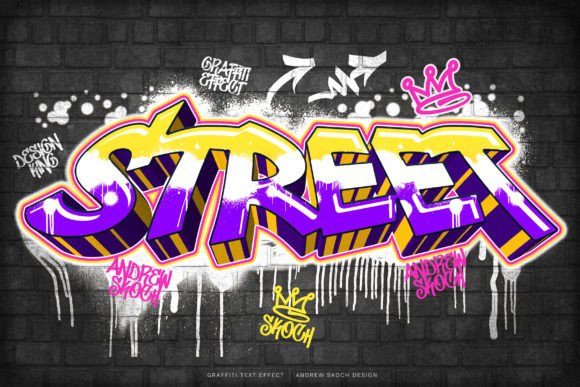
The Graffiti Text Effect is a set of Photoshop templates that allow users to apply a stylized graffiti look to any custom text. These templates are pre-designed with layers and smart objects that make it easy to replace default text with your own message while retaining the authentic feel of street art. The result is a visually striking composition that mimics the unpredictable, energetic style of real-world graffiti but remains clean and professional in appearance.
Unlike generic text effects, the graffiti text effect is tailored to maintain the integrity of different font styles—both decorative and regular fonts—while transforming them into something more vibrant and attention-grabbing. It works particularly well with bold, simple fonts, making it accessible even for beginners who might not have access to complex typefaces.
Key Features and Benefits
- Smart Objects: Easily customize the text by placing your design inside a smart object, ensuring flexibility and scalability without losing quality.
- High Resolution: Each template is created at 3000x2000 pixels and 300 DPI, making it suitable for both digital and print use.
- Two Template Formats: Choose between landscape and square formats to suit various platforms like Instagram banners, YouTube thumbnails, or flyers.
- Well-Organized Layers: Simplifies the editing process and allows for greater control over individual elements of the design.
- Free Font Downloads Included: A PDF help file provides direct links to all necessary fonts, saving time and effort when sourcing typography.
- 100% Editable: Offers full creative freedom to adjust colors, textures, and other visual aspects to match your project’s theme.
This level of customization makes the Graffiti Text Effect especially valuable for those who want to maintain brand consistency while adopting a more modern or rebellious visual language.
Strengths of Using Graffiti Text Effect
One of the most significant advantages of the Graffiti Text Effect is its ease of use. Designers don’t need to master intricate brushwork or layer blending techniques to achieve a convincing graffiti look. Instead, they can simply open the PSD file, edit the smart object, and export the final design ready for use. This streamlined workflow is perfect for fast-paced environments where creativity must meet deadlines.
Additionally, the templates are optimized for multiple applications. They can be used for:
- Movie or cinematic titles
- YouTube and Facebook covers
- Instagram banners
- Book or CD covers
- Website headers or promotional banners
This versatility ensures that the graffiti text effect can adapt to a wide range of design needs. For instance, a music festival flyer using this effect can evoke the raw energy of street culture, while a website banner for a youth-focused campaign can benefit from the same bold, eye-catching appeal.
Comparing Graffiti Text Effect to Other Design Resources
When compared to other text effects or design tools, the Graffiti Text Effect stands out for its balance between realism and usability. While some graffiti-style assets may require manual painting or adjustment, these templates automate much of the process, allowing for quicker results without sacrificing quality.
Here's how it stacks up against similar options:
- Brush-Based Effects: These often require skill in using brushes and layer masks. The graffiti text effect simplifies the process by offering a pre-built structure.
- Vector-Based Graffiti: Can be scalable but may lack the texture and spontaneity found in the graffiti text effect’s raster-based approach.
- Generic Urban Fonts: May not integrate as seamlessly with background textures or lighting effects as the graffiti text effect does.
In terms of cost-effectiveness, many premium design bundles offer limited graffiti-related assets. In contrast, the Graffiti Text Effect gives you two high-quality templates with detailed instructions and fonts—all for a single purchase.
Best-Fit Use Cases for Graffiti Text Effect
The Graffiti Text Effect is best suited for projects that benefit from a strong visual identity rooted in urban aesthetics. Here are some ideal scenarios where this tool shines:
- Social Media Content: Create engaging posts for platforms like Instagram, Facebook, and YouTube with a fresh and contemporary look.
- Event Posters: Music festivals, underground art shows, and youth-oriented events can leverage the graffiti effect to capture the right vibe.
- Creative Branding: Brands targeting younger demographics or seeking to express rebellion, authenticity, or cultural relevance can incorporate the graffiti text effect into logos or promotional materials.
- Editorial Design: Magazine covers, zines, or independent publications often use graffiti-inspired text to break away from traditional layouts.
These use cases highlight how the graffiti text effect can bridge the gap between casual street art and professional design. It’s a great way to bring an artistic edge to commercial work without overcomplicating the production pipeline.
Potential Limitations and Tradeoffs
While the graffiti text effect is highly versatile, it does come with certain limitations. One key consideration is that it’s designed specifically for Photoshop. Users working primarily in other software (such as Illustrator or After Effects) may need to convert or adapt the files, which could add extra steps to their workflow.
Another tradeoff is that although the effect looks realistic, it’s still a digital interpretation of graffiti. If the goal is to replicate hand-painted murals with extreme detail or organic imperfections, additional tweaking or layered adjustments may be required. However, for most practical applications, the included templates provide sufficient depth and character.
Moreover, the graffiti text effect may not be appropriate for every design context. For example, formal business presentations, luxury branding, or minimalist web interfaces would likely benefit more from clean sans-serif fonts rather than a graffiti-styled alternative. Understanding your audience and the purpose of your design is crucial before applying such a bold visual element.
How to Integrate Graffiti Text Effect into Your Workflow
Using the Graffiti Text Effect involves just a few straightforward steps:
- Download the two provided PSD files (landscape and square).
- Open the desired template in Adobe Photoshop.
- Locate the smart object layer containing the default text.
- Double-click the smart object to edit the text and replace it with your own message.
- Save the changes and export the final image in the needed format.
Thanks to the well-documented help file, even novice users can follow along without prior experience. The inclusion of font download links eliminates the need to search for compatible typefaces separately, streamlining the entire setup process.
When to Consider Alternatives
If your project requires a more subtle or elegant approach, the Graffiti Text Effect may not be the best fit. In such cases, alternatives like serif text overlays, vintage posters, or abstract watercolor effects could better align with your goals. Similarly, if you’re aiming for a hyper-realistic mural or a hand-painted look, investing time in brush-based techniques or hiring a specialized artist might yield superior results.
Also, consider the platform where the design will be used. High-resolution outputs are excellent for print or large-scale displays, but for smaller screens or mobile devices, ensure that the graffiti text doesn't become too cluttered or lose readability due to excessive texture.
Conclusion
The Graffiti Text Effect is a powerful and user-friendly design tool that brings the essence of street art into digital creation. With its smart object functionality, high resolution, and compatibility with various fonts, it’s a go-to option for creating impactful visuals across multiple mediums. It’s particularly beneficial for designers who appreciate urban culture and want to add an expressive touch to their work without the complexity of manual illustration.
However, like any design asset, it has its place. When evaluating whether to use it for your next project, consider the tone, audience, and medium. If the graffiti aesthetic resonates with your message and enhances your design’s overall impact, then this tool could be exactly what you need. But if subtlety and refinement are more important, it’s worth exploring complementary design approaches instead.